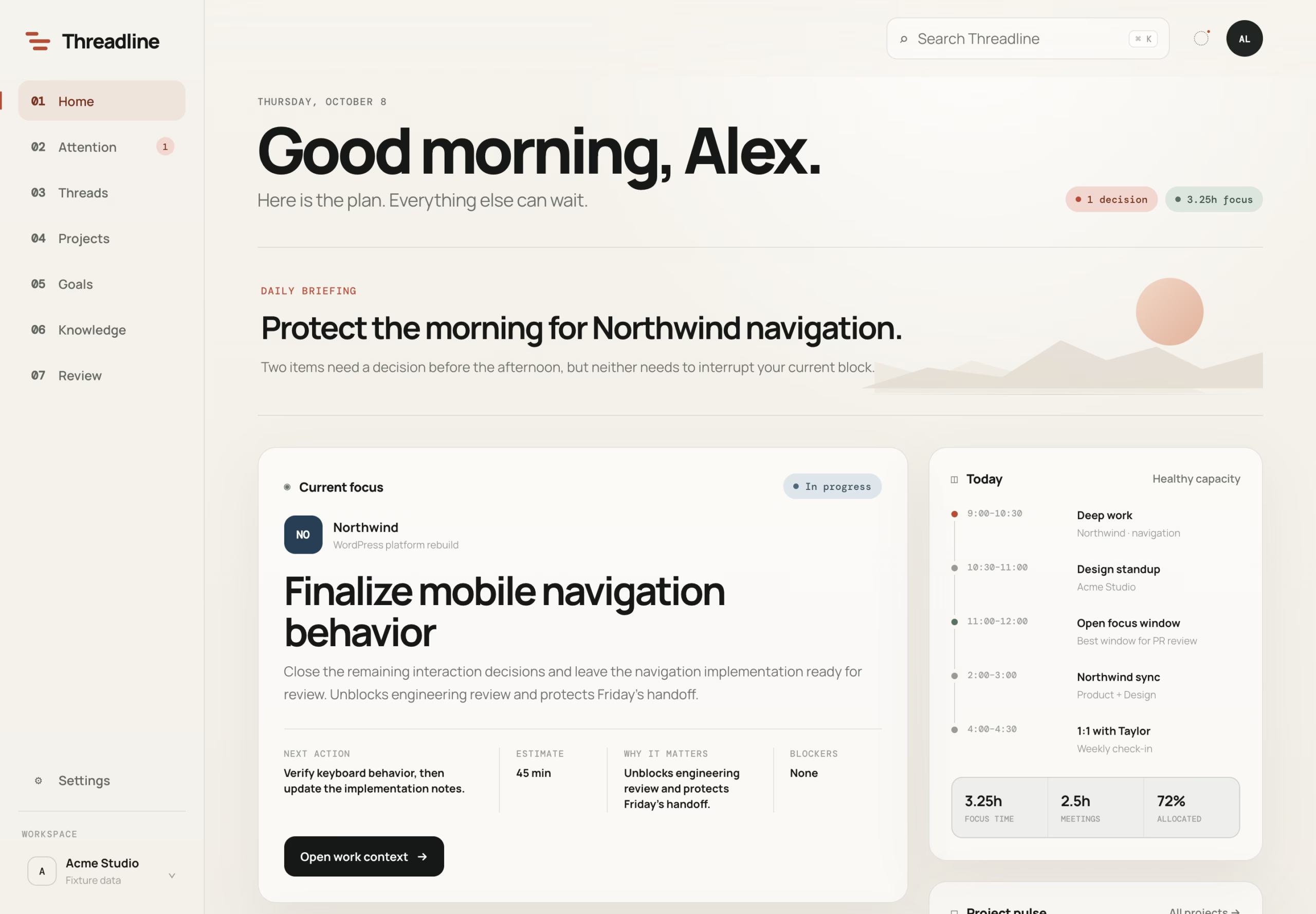
Bringing projects, priorities, meetings, and code reviews into one place—without creating another system to maintain.
Software engineering has become increasingly good at producing information and increasingly demanding when it comes to managing it.
On any given day, I might be working across several projects, each with its own priorities, deadlines, and allocated time. Between those projects are meetings, incoming code reviews, shifting requirements, unexpected issues, and the occasional interruption that completely rearranges the afternoon.
None of this is particularly unusual. It’s the nature of working in a collaborative engineering environment.
But I’ve found that a surprising amount of my energy goes toward something other than engineering: keeping track of everything surrounding the work.
What needs my attention? Which projects am I falling behind on? How much uninterrupted time do I actually have? What changed while I was away? Where did I leave off on something I last touched three days ago?
The information exists. It’s just scattered across project management software, calendars, repositories, messages, and whatever I can remember.
I started building Threadline to bring that context together.
The problem isn’t a lack of tools
I already have applications that do their jobs well.
Teamwork manages projects and tickets. Google Calendar accounts for my schedule. GitHub tracks code, pull requests, and reviews.
I didn’t need to replace any of them.
What I needed was something sitting above those systems, capable of interpreting their information in the context of my workday.
A task management system can tell me that a ticket is due today. My calendar can tell me I have three meetings. GitHub can tell me someone is waiting for my review.
Individually, those are useful facts. Together, they might tell me that my original plan for the day is no longer realistic.
That’s the distinction I wanted Threadline to address.
Rather than giving me another place to manage work, it should help me understand the work I already have.
Designing around attention instead of information
One of my earliest design decisions was to resist the temptation to build a traditional productivity dashboard.
Dashboards tend to accumulate information. There’s always another metric, widget, chart, or status worth displaying. Eventually, understanding the dashboard becomes its own task.
I wanted the opposite.
Threadline should answer a few questions quickly:
- What deserves my attention right now?
- What should I work on next?
- What needs watching, but doesn’t require action yet?
- Do I realistically have time for what I’ve committed to?
- Is there something I need to communicate or resolve before continuing?
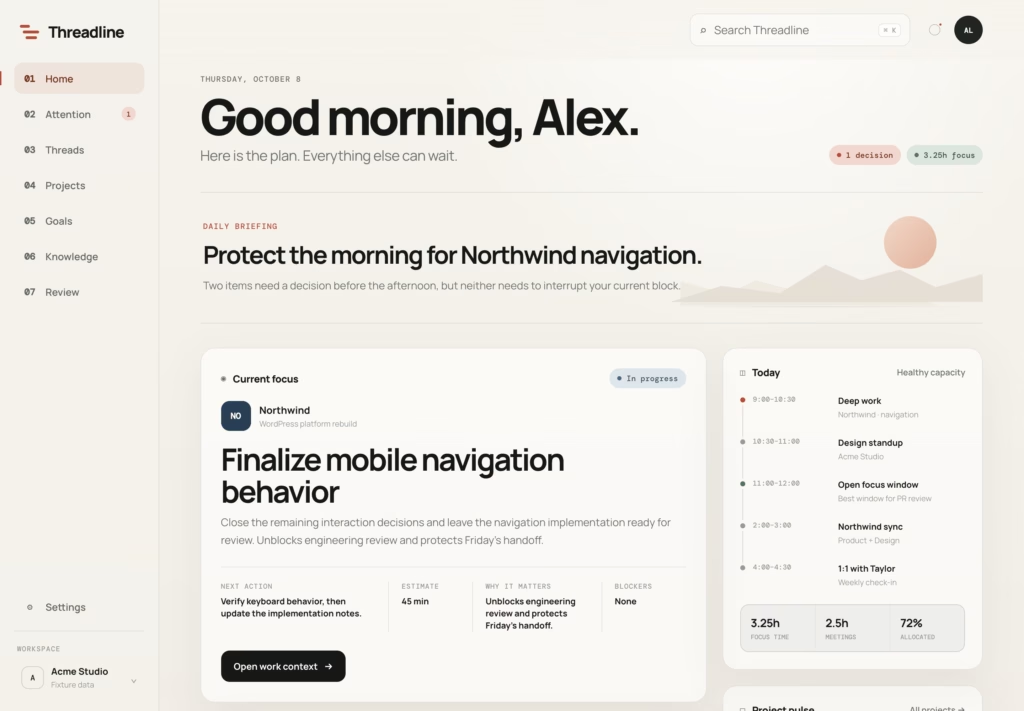
This led to a deliberately restrained attention model: Now, Next, and Watch.
Now represents the things that require immediate consideration. Next captures actionable work that matters but isn’t necessarily urgent. Watch holds developing concerns that aren’t worth interrupting the day over.
An important detail is that not everything gets promoted to urgent just because it’s overdue. Old due dates, for example, can be misleading. If every neglected ticket becomes an emergency, the dashboard stops communicating anything useful.
The intention is to surface meaningful exceptions rather than reproduce every notification from every source.
A realistic understanding of available time
An eight-hour workday rarely contains eight hours of development time.
Meetings occupy part of it. Code reviews take attention. A project may need an estimate before implementation can continue. Another team member may need help. Personal obligations can interrupt the schedule.
And those interruptions aren’t necessarily problems. They’re part of the workday, too.
The actual problem is planning as though they don’t exist.
Threadline uses calendar events and configured working hours to calculate the remaining focus time available in a day. It compares that time against estimated work and identifies when the workload no longer fits.
This matters because I often work with project-specific resource allocations. I want to understand whether I’m realistically able to deliver against those allocations, not simply whether I have a list of tasks that need completing.
The distinction between hours allocated and hours actually available is important.
If the available time changes, the plan should be open to changing with it.
I’d rather identify an unrealistic commitment early enough to have a conversation about it than discover the discrepancy when the deadline arrives.
Picking up the thread
Another problem I wanted to address is the cost of returning to unfinished work.
Consider leaving a project on Thursday, spending Friday working elsewhere, and picking it up again on Monday.
The ticket may still be there, but the context surrounding it has probably faded.
What was the last decision? Was there an unresolved question? Did someone respond to a review? Did the deadline move? What was I planning to do next?
Reconstructing that context takes time, and it’s especially frustrating when I know I already did the thinking once.
Threadline now includes a While You Were Away view that compares work activity across sessions. It can surface changed assignments, moved due dates, review updates, and calendar changes.
That solves part of the problem: identifying what changed while I wasn’t looking.
The larger ambition is preserving continuity of thought.
I want to retain useful decisions, findings, and open questions at the task and project level. Eventually, returning to a project should feel less like investigating its history and more like continuing a conversation I left unfinished.
The current project-memory system is still an early foundation for that idea. There is more work to do before context preservation becomes as automatic as I’d like.
How Threadline works
I deliberately kept the initial architecture relatively straightforward.
The interface is built with HTML, CSS, and JavaScript, without requiring a frontend build process. A Node.js and TypeScript backend connects to external sources, transforms their data into a common format, and generates the state consumed by the interface.
The pipeline looks roughly like this:
External APIs → Source adapters → Normalized entities → Attention and workload rules → Dashboard state
Teamwork contributes tasks and project activity. Google Calendar provides schedule and availability information. GitHub contributes issues, pull requests, review requests, and other repository activity.
Each source has its own adapter. Once the data is normalized, the dashboard doesn’t need to understand which API originally produced a given work item.
That separation gives me room to add new systems without continually rewriting the interface.
For example, the attention model doesn’t need entirely different logic for a Teamwork ticket and a GitHub review request. Both can be evaluated as work requiring consideration, even though their underlying data structures differ.
The application also supports fixture data, which lets me develop and test different workday scenarios without depending on live accounts or exposing private project information.
Why the first version doesn’t depend on AI
Despite spending a lot of time exploring AI-assisted engineering, I intentionally kept Threadline’s initial prioritization logic deterministic.
If a review needs my attention, or my estimated workload exceeds the time available, I don’t need a language model to tell me.
I need predictable rules, understandable signals, and the ability to inspect why something was prioritized.
That doesn’t mean AI has no place in the project.
It could eventually help summarize complex project activity, preserve technical context, identify recurring patterns, or prepare useful briefings from information that would otherwise take significant effort to digest.
But I don’t want AI making basic decisions that conventional software can handle more reliably.
The objective is useful interpretation, not intelligence for its own sake.
Reporting without reconstructing the day
A practical feature that emerged during development was the ability to generate daily progress reports.
At the end of a busy day, reporting what happened can become another exercise in remembering.
Which tickets did I move? What was handed off for review? What remains blocked? What still needs attention tomorrow?
Threadline gathers project activity and organizes it into daily, project-specific summaries. The resulting reports can be copied into Slack rather than assembled manually from several different tools.
I’m interested in pushing this further.
Daily progress should eventually contribute to weekly project summaries, retained technical decisions, and longer-term records of what was accomplished.
There is value in knowing what happened today. There’s arguably more value in being able to revisit an entire project months later and understand what was learned along the way.
I want the information generated through ordinary work to remain useful after the immediate task is finished.
What comes next
Threadline is already useful to me as a working dashboard, but I consider it an evolving tool rather than a finished product.
The current version brings together several of the systems I interact with regularly. The next challenge is making those systems more contextually aware of one another.
I’m particularly interested in connecting resource planning and project requirements to the actual execution of engineering work.
I’m also experimenting with parallel AI-assisted development, where specialized agents can research, implement, and validate work before it reaches a human review stage.
That introduces a new coordination problem.
If multiple agents are operating across several tasks, how do I distinguish work that’s ready for review from work that’s blocked, unverified, or in need of a decision?
How should those activities influence the priorities of a real workday?
And how do I retain the useful findings generated along the way?
I see Threadline becoming a natural place to explore those questions. Not necessarily as a system that performs all of those operations itself, but as an interface for understanding and coordinating them.
Making room for the actual work
Building Threadline has reinforced something I’ve been thinking about for a while: productivity software is often too focused on managing individual tasks and not focused enough on the broader conditions in which those tasks happen.
It’s relatively easy to maintain a list of things that need doing.
It’s harder to keep an accurate picture of available time, dependencies, responsibilities, changing priorities, and the context required to work effectively.
Those are the problems I’m interested in solving.
I don’t expect Threadline to eliminate interruptions or make every day unfold according to plan. Real engineering work doesn’t operate that way.
What I want is a system that makes it easier to recognize when the plan needs to change, understand what deserves attention, and return to meaningful work without spending so much effort reconstructing everything around it.
That seems like a worthwhile thing to build.
Threadline is open source and available on GitHub. The repository includes setup documentation, example data, and screenshots of the interface.